
Even though we’re using a HTTP/S distribution point, that should allow for resumable downloads we sometimes see the above error.
Below are some more details around this, and a break-fix.
Continue reading
Even though we’re using a HTTP/S distribution point, that should allow for resumable downloads we sometimes see the above error.
Below are some more details around this, and a break-fix.
Continue readingWithin our Casper environment all our distribution points are HTTPS. On occasions we’ll get the emails from our JAMF Software Server containing the above error.
Below are some more details.

Way back in 2011 I wrote the post: Managing Apple Software Update Server Across Multiple Servers 10.5/10.6/10.7. This itself was based off of an Apple KB article that seems to have disappeared, but the method outlined in the post above is alive & well, just needs some tweaking for 10.8+.
Continue reading
Most of the Macs I support are mobile & it seems that around the with the release of the “Unibody MacBook Pro” Apple stopped shipping Macs with a battery that would keep the Macs time even when the Macs main battery had died.
This means that if a Macs battery dies during travelling to another office, they’d not be able to login once there as the time would be more than 5 minutes out. Also, we heavily use SSL to secure things like our Wireless & many websites (JSS distribution points included).
So the solution was for me to setup my own NTP, that would both sync with my domains NTP & be externally accessible for those mobile users on the road.
I’ve posted How To: Set a Macs Time Server, How To: Sync Time With NTP via Script & How To: Check Your Active Directory Domains Time. They all came about when 1st looking at this issue, this last post in the series with use all those posts.
Continue reading
So far I have posted 2 blog posts on How To: Set a Macs Time Server & How To: Sync Time With NTP via Script. Well, why am I posting this?

A recent post showed how to forcibly update a Macs time against a given NTP server, i’ve since been asked how to set the Macs NTP server.
This post will try & show you how.
Continue reading
I’ve been trying to restore my JSS 8.73 to a test server in preparation to test upgrading to 9.2x, but during the restore i was getting the error “ERROR 2006 (HY000) at line 1692: MySQL server has gone away” as shown below.
Continue reading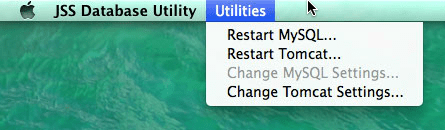
When creating test JSS instances, I often stumble over this issue where the “Change MySQL Settings…” option is greyed out

A few weeks ago I posted “Because MacMule,” but this is only part of the story. Not only have the Mac Admin community greatly assisted me over the years, but that post did a disservice to the company I work for as i neglected to mention them.
That company is Pentland Brands & you’ve probably never heard of us. But please take a moment to look at our recently re-launched site to get a real flavour of the company & it’s values.
Continue reading
As mentioned in my previous post, we have a simple cluster setup for our JSS.
However, I’ve seen and intermittent issue with permissions to /var/log/jamfChangeManagement.log, below are more details as well as a break-fix solution.
Continue reading